SaveInsta : Instagram Downloader
Download videos, Photos, Reels, Stories and IGTV from your Instagram or public accounts
Instagram Photo Download
Enter the Instagram PHOTO URL below
Download Instagram Reels Video
Enter the Instagram Reels URL below
Instagram Story Download
Enter the Instagram Stories URL below
IGTV Video Downloader
Enter the Instagram IGTV URL below
SaveClip is not affiliated with Instagram™. We do not host any Instagram content. All rights belong to their respective owners. We respect privacy — public content available only. 👉 Read more Terms of Service
SaveInsta - Best Instagram Downloader
SaveClip (formerly SaveInsta) is an online Instagram Downloader. Support download Videos, Photos, Stories, Reels and IGTV from Instagram in few simple steps.
SaveClip.app is a website that allows you to download high-quality content on Instagram (download Instagram videos in mp4, download Reels, download IGTV, download images, download Stories). Simply paste the public Instagram link into the input box on the SaveInsta website to save the content to your device.
Instagram Video Downloader works on web browser, supports download Instagram videos on all devices (PC, Mac, Android, iOS) without installing supporting software.
Why should you use SaveInsta - Instagram Downloader?
What is Instagram? Instagram (often abbreviated as IG or Insta) is a social network that allows users to share popular photos and videos. Users can download the free Instagram app on iOS and Android platforms to enjoy a variety of experiences by photo, story, reels and video editing modes.
SaveClip is intended to help users save their own Instagram content or public content they are authorized to use, where permitted by applicable law and platform terms.
SaveInsta is an Instagram video downloader. Download Videos, Reels, Photos, Stories and IGTV from Instagram for all devices (PC, Mac, Android, iOS).
Features of SaveInsta:
- Download Instagram Video: SaveInsta allow download videos from Instagram (IG, Insta) with HD video quality (without changing the quality of the original video).
- Download Instagram Photos: The Instagram Photo Downloader on SaveInsta makes it easy for you to download and save images from Instagram effortlessly right on your web browser.
- Download Instagram Reels Video: SaveClip.app allows you to download Instagram Reels videos in mp4 format on all devices (PC, Mac, Android, iOS).
- Download IGTV Video: IGTV is a long video on Instagram, SaveInsta supports download IGTV videos to your device for storage or playback when there is no 3G, wifi connection.
- Download Instagram Story: Users may save their own public Stories or public Stories they are authorized to use. SaveClip does not support private, restricted, or login-protected content.
How to download photos and videos on Instagram?
Step 1: Open the Instagram app on your phone or access the Instagram.com website on PC.
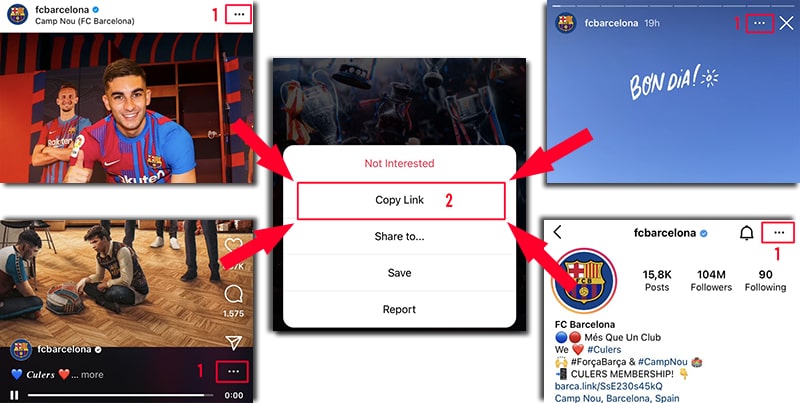
Step 2: Find the content you want to download and click on the icon (...) above the post and then continue pressing the Copy Link option.
Step 3: Go to the website SaveClip.app, paste the Instagram link you just copied into input box and press the Download button.
Step 4: Photo and Video you want to download will appear, click Download Photo or Download Video button inside under a photo or video, then the file will be saved to your device.
With SaveClip.app, you can download public content on Instagram such as: Videos, Photos, Reels, Stories, IGTV. We will continuously upgrade to bring the best experience for you! Please share this tool with your friends and relatives. Thank you!
Our download tool is designed to assist you in downloading videos and images posted by your own account. However, we reserve the right not to provide the service if you use this tool to violate the privacy and materials of others.
Read our Terms of Service 👉here👈
FAQ
What is Instagram Downloader?
How to download videos and photos on Instagram?
- Step 1: Paste the Instagram url into the input box and press the Download button.
- Step 2: Photo and Video you want to download will appear, click Download Photo or Download Video button inside under a photo or video, then the file will be saved to your device.
- (SaveClip.app works well on all devices (PC, Mac, Android, iOS).)