Download Instagram Reels Video
Download Reels videos from Instagram online
SaveClip is not affiliated with Instagram™. We do not host any Instagram content. All rights belong to their respective owners. We respect privacy — public content available only. 👉 Read more Terms of Service
Best Instagram Reels Video Downloader
Reels Downloader is an online Reels video downloader, download Reels videos on Instagram, download Reels videos in mp4 format, save Reels videos from Instagram (Insta) to your device in a few simple steps.
The Instagram Reels video downloader provided by SaveInsta allows you to download Reels videos on Instagram. Simply paste the public Instagram link into the input box on the SaveClip.app website and press the Download button to save the video to your device.
Reels video downloader works on web browser, can download Reels videos from Instagram quickly without install software. Supports download Reels videos in mp4 format on all devices (PC, Mac, Android, iPhone, iPad).
Why use SaveInsta to download Reels videos from Instagram?
What are Instagram Reels ? Instagram Reels is a new feature of the Instagram social network that allows you to create short videos of 15 and 30 seconds in length. Inheriting the outstanding editing features of Instagram, users are free to design and edit unique videos in their own style.
However, Instagram does not support users to save Reels videos directly within the app. To download Reels videos, you can use SaveInsta to download Reels videos from Instagram in the easiest way. This tool allows you to download public Reels videos on all devices such as PC, tablets, phones (iPhone, Android).
How to download Reels videos on Instagram (Insta)?
Step 1: Open the Instagram app on your phone or access the Instagram.com website on PC.
Step 2: Find the content you want to download and click on the icon (...) above the post and then continue pressing the Copy Link option.
Step 3: Go to the website SaveClip.app, paste the Instagram link you just copied into input box and press the Download button.
Step 4: The video you want to download will appear, keep clicking the Download Video button below each video, then the file will be saved to your device.
How to download Instagram Reels videos on iPhone, iPad
Note: Download Instagram videos only works with iOS 13+ and iPadOS 13+ (iOS 12 and below see instructions here).
Step 1: Open the Instagram app on your phone or access the Instagram.com website on PC.
Step 2: Copy Url Reels on Instagram
Find the content you want to download and tap the (...) icon below the post and then continue pressing the Copy Link option.
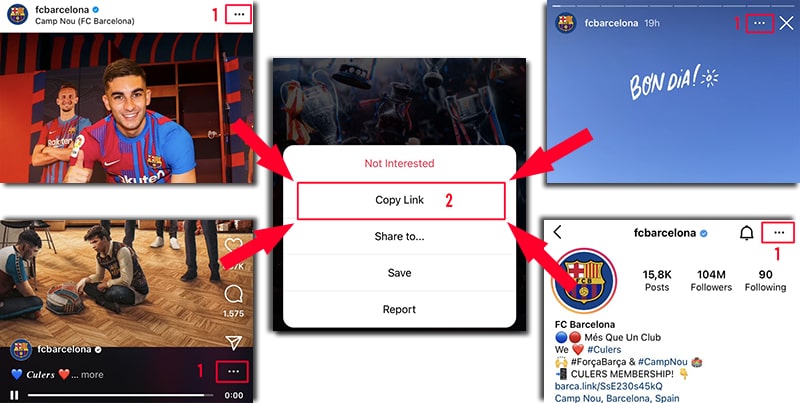
Step 3: Go to the SaveClip.app website with Safari, paste the copied Instagram link in the input box and press the Download button.
Step 4: The video you want to download will appear, keep clicking the Download Video button below each video, then the file will be saved to your device.
With SaveClip.app, you can download public content on Instagram such as: Videos, Photos, Reels, Stories, IGTV. We will continuously upgrade to bring the best experience for you! Please share this tool with your friends and relatives. Thank you!
Our download tool is designed to assist you in downloading videos and images posted by your own account. However, we reserve the right not to provide the service if you use this tool to violate the privacy and materials of others.
Read our Terms of Service 👉here👈
FAQ
How to download Instagram Reels video?
- Step 1: Paste the Reels video url in the input box and press the Download button.
- Step 2: The video you want to download will appear, keep clicking the Download Video button below each video, then the file will be saved to your device.
- (SaveClip.app works well on all devices (PC, Mac, Android, iOS).)